On some occasions, the
AppKu™ team or your manager may ask you to "
clear your cache" or "
refresh your browser". Here's how to do just that in the 2 most popular web-browsers...
First, open your browser, and navigate to the relevant web application (if you don't have it open already).
Follow the instructions below based on the browser you're using (u
nsure? click here).
Chrome
- Click the icon next to the URL/Search bar, then select "Site settings".
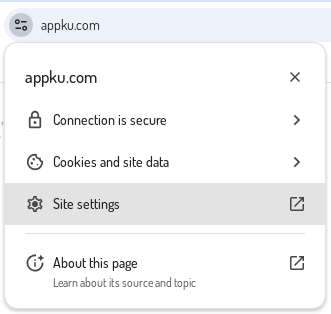
- In the new "Settings" tab that opened, click the "Delete data" button, followed by "Delete" in the prompt.

- Close the "Settings" tab.
- On the original page (tab), refresh your browser cache by hitting:
CTRL+F5
This will cause the page to reload. If the hotkey doesn't work, hold SHIFT and click the browser refresh button.
Internet Explorer
- Click the icon next to the URL/Search bar, then select "Cookies and site data".
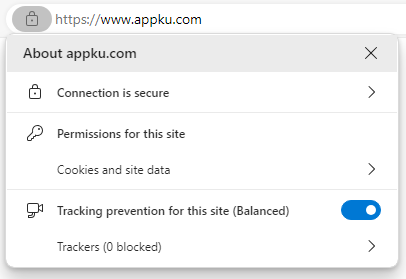
- If any cookies are listed, click "Cookies (...)" and proceed to the next step.
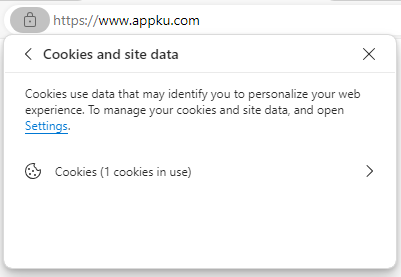
- In the dialog that appears, select the domain name, then click the "Remove" button.
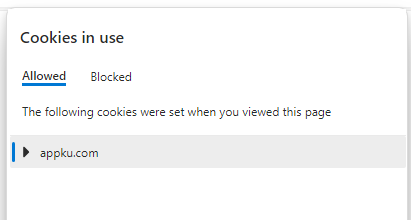
Click the Remove button:

Do NOT click "Block" or your application may stop functioning.
- Click "Done" to close the dialog.

- Now refresh your browser cache by hitting:
CTRL+F5
This will cause the page to reload. If the hotkey doesn't work, hold SHIFT and click the browser refresh button.

